

Brandmerry Blog Archives

How to Add SEO to Your Squarespace Website
How to Add SEO to Your Squarespace Website
I know how important it is to drive traffic to your website if you have a blog. Otherwise, what's the point, if no one can actually see the content that you're creating? So today I want to support you in two pieces of the puzzle to improving the SEO on your website.
1. Content is Key
Number one is your content. I am telling you that none of the cool features matter if the content on your blog and on your website is kind of crappy and ultimately if your audience doesn't want it, then they're not going to be searching for it, so it's really important that you put the majority of your energy on creating content that your audience wants. You need to know who your audience is and, more specifically, what it is that they're looking for online and then you create the content to meet that need.
Some of my favorite ways to find out what my audience is searching for are to step in their shoes and imagine what they're googling online. Now if you're like, I don't want to imagine Michelle, I just want to know specifically, so I ask them. Go ahead in a group, in a private community and ask them what they're searching for online or what specific questions they have about the industry that you're in. Another fun tip is to go to blog posts that are in a similar industry as you would see, what kind of comments are coming through the bottom, see what people are asking about, and then create content that meets that need. Or, go into a facebook group and see what people are asking about your specific niche and create content that again meets that need. I can't stress enough to you how important content is and if you're struggling with coming up with ideas, it is as simple as asking your audience, what can I create for you?
Some of my biggest, most impactful, most traffic driven blog posts that I have are really specific, so the titles themselves need to be really specific as well. Some examples for you are "7 Tips For A Well Branded Photo Shoot" or "How to Convert Clients on your Website." Remember you. People are searching for the content that they need, so make sure that not only is the content amazing, but also the title is super descriptive and on point for what your audience is ultimately searching for.
2. Keywords
The second piece of this puzzle is my favorite thing to do, and that is adding keywords to your blog posts. Now, I do not suggest that it's just a keyword heavy blog posts, so it's just keywords, right? You're not actually giving value, none, no, no, no, no. Lead with value, but add in those key words that's going to tell Google, hey, that's what this blog post is about.
Another really cool thing that you could do is add keywords to the images within your blog post. If you watch the whole Youtube video below, I actually dive-in to my Squarespace site and show you exactly what I'm talking about here. As a result, I saw this was having a big impact on my SEO. You'll see I have a ton of images in my blog post. I have videos, I have all kinds of things. One of the things that I absolutely love to do is to go in and edit the image. Once you upload your image, you'll see a place for file name, update your file name, make your file name, the name of your blog post, or maybe a key word that is in relation to your blog post. This helps Google rank your content. So they're pulling all the different pieces from your website, including your images, so update your file name. It's as simple as seriously just clicking on here and typing what ever you want. I don't have captions underneath my photos, that you guys can see, but I do have things written. Again, giving google more to work with, with my site. Again, I show you exactly how to this in the video below, so be sure to watch if you're not sure what to do!
Bonus Tip
I'm going to give you guys one more bonus that I absolutely love. At the end of all my blog posts throughout my website, I have a lot of personal information, and I have a signature. This is another amazing space to add a little bit more seo to your website. You can go ahead and just type in your title right or maybe the name of your business. So for me, I type branding and business coach, and then I can also go into design caption below and you'll see branding and business coach. Okay, so this helps. This helps you rank on Google for your title. It helps Google know who you are, what it is that you do specifically. And again, all I have to do is do not display caption and hit apply. So fun little tip for you in improving SEO. Using images on Squarespace, making these small changes to the content that you're creating and the SEO that you are adding to your website in the form of keywords can have a big impact on your brand awareness.
Can I get an "A" for driving traffic to your website with zero ad spend? That's like the entreprenuers dream, but I also understand that coming up with content, coming up with ideas is kind of daunting. So I have a really cool free resource for you that you can grab here: https://brandmerry.lpages.co/content-creation-training/
It's how I map out 30 days worth of content and as little as 30 minutes, there's a really cool bonus video that kind of walks you through my process and they're really easy spreadsheet that you can use in your own business to kind of categorize what content you're going to create and plan it all out in advance. It's going to help you overall in your business, if you can start streamlining these practices now.
You can watch the whole video for a more in-depth tutorial of this with several bonus tips below!
Head over to Youtube and be sure to like and comment on the video while you are over there to help more people see this information ↠ https://youtu.be/H39rEQNWBdw
And as always please share and comment on this blog post, I love connecting with you!


Michelle Knight is a Branding and Business coach for female entrepreneurs who are struggling to gain visibility and traction to take their business to the next level. She works with her clients to dive deep into their story so they can create a brand and message that positions them as an expert and allows them to create their desired income to free up time in their schedule for what matters most. Learn more >>

How to use quizzes to grow your list and online community
How to use quizzes to grow your list and online community

Seriously, how much fun is taking an online quiz? I mean think back to the quizzes we use to take in magazines with our girlfriends, I was obsessed!
Now imagine how excited I was when I discovered Interact and their ability to allow me to create quizzes for my biz. YES! What an amazing opportunity to provide your audience with something fun and engaging, while also helping you grow your business (hello lead generation).
Today I want to show you how freaking easy it is to create a quiz for your brand and business in just a few simple steps.
The Prework
Decide on a topic. This is an awesome opportunity for you to create a quiz that is in alignment with your brand mission, voice and ultimately leads your audience to a program you offer. Think of something that will give your audience a sample of what it would be like to work with.
Choose your results. You know I’m all about that reverse engineering and it’s super helpful when creating a quiz. Think of the different results you will have available for your quiz. Once you’ve gained clarity on them you can easily add them to your quiz platform.
Decide on your questions. I went old school with this one and wrote out all my questions and answers in a notebook. This helped me narrow it down to just 7 questions (the recommended number by Interact). You’ll want to map out the questions and answers and connect them to a specific result.
The Setup
I chose to work with the Interact platform to create my quiz, and so glad I did, it was so easy. I loved how simple it was to create, all the flexibility and integrations and the awesome help articles. Here’s a look at how I created my quiz in 7 easy steps.
Step 1: Your Brand Style
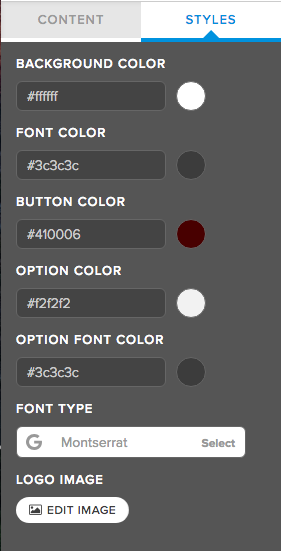
Any opportunity I have to create on brand content is right up my alley. During this phase, I added my brand fonts and colors so it seamlessly connected to my other content online.
Step 2: Your Cover Page and Photo
You have the flexibility to add a quiz title and description. I created my cover photo in Canva to match my brand.

Step 3: Your Results
The next step is to add in your results. You’ve already written these out so it should be super easy to just add them to the platform. You have the option to here to redirect your users to a landing page or keep them on the platform. I’ve shown you both below.
First, you’ll set up the name of your response and add in the cover photo and description below.

I wanted to host my results on my website, so all I had to do is create a new page on my Squarespace website and redirect the URL for each.

Step 4: Write Your Questions
Again, you’ll be really glad you did the pre-work here because it makes this process so easy. At this stage, you’ll enter in your questions for the quiz. You have the option to do text only answers or use images (I suggest a combination of both). You’ll repeat this step until all your questions have been entered.

Step 5: Link Your Responses
Once the questions have been entered you will go back and connect each answer to a result. This was so much fun because it makes this cool little spider web!
For each question, you go to “Edit Result Correlations” on the top right-hand corner.
Then select the circle next to your answer and the corresponding result.

Step 6: Integrate for List Building
This might be the best part about Interact; they integrate with all major email marketing platforms include my personal favorite Convertkit. The integration process was super easy.
1) Set up your opt-in form. Remember we are using this to build your list so this is super important.

2) Integrate your email marketing platform. I use Convertkit and absolutely love them.
3) Add in tags and forms based on the various results. I wanted to send an email recap of the user's results so I created one single form in Convertkit for “Brand Story Quiz” and separate sequences for each result.

Step 7: Test and Share
Now onto the final step, I told you this was easy!
The Interact platform has a bunch of options for sharing your quiz with the world and start growing your list with targeted leads. For my quiz, I opted to Embed on my landing page and add an announcement bar to my website.

To embed on a Squarespace website all you have to do is grab the embed code from Interact, create a new page in Squarespace and add the embed block.

Voila, you’ve got yourself a quiz lady!
I’m telling you with an easy platform like Interact you’ll be seeing more quizzed from me very soon. If you’re interested in exploring your options with Interact, just click here.
Remember quizzes do so much more than help you build your list, they also give your ideal client a better understanding of your brand and the work that you do while also providing value to your audience - which is what it’s really all about.
Discover Your Brand Story by testing out my Interact quiz: brandmerry.com/quiz
And as always please share and comment on this blog post, I love connecting with you!
Michelle Knight is a Branding and Business coach for female entrepreneurs who are struggling to gain visibility and traction to take their business to the next level. She works with her clients to dive deep into their story so they can create a brand and message that positions them as an expert and allows them to create their desired income to free up time in their schedule for what matters most. Learn more >>

My Top Time Management Tricks and Tools to Scale Your Business Quickly
My Top Time Management Tricks and Tools to Scale Your Business Quickly

My time management has changed as my business has evolved, especially since becoming a mom. I'm excited to share with you different time management tricks and tools you can use throughout different phases of your business.
Beginning/Side Hustle Phase
I started my business in January of 2015, my son was just a month old, and I had a couple weeks left in my maternity leave from my 9-5. A big thing I learned right from the beginning was that I had to focus on what worked for me instead of trying to do all the things I was seeing other coaches and online business owners do.
One thing that has stayed consistent throughout the entire life of my business was batch scheduling. If you have kids like me, you know how important it is when you are doing the creative tasks in your business, you really need to be in the zone. When I was still in my 9-5, my batch days were Sundays. I would write my emails and social media posts for the entire week. This was 2-3 hours that I could sit, kid free, and schedule out all of my content. I still do this now, and I just shared a behind that scenes of what this looked like on my Instagram. You can go follow me and check out my Featured Stories here: Instagram.com/brandmerrycoaching
My two main focuses at this phase in my business were: growing my community and making sales. It was really about where to put my energy towards that would make the greatest impact. At this time, that meant showing up, nurturing my community and making sales. It's really important to set an intention early on about what my business was and make it a top priority. I really believed that this was it. This was my business, my source of income. I made the intention that I would have the time to focus on my business.
Start-up Phase
Probably the biggest area of growth for me was once I left my 9-5. This was a very scary time in the Knight household. Monday and Friday became my new batch scheduling days, and the way I was able to do this was with help. I got 3 hours on Monday and 3 hours on Friday while my son got some great playtime with his grandma. I would write my emails and blog post for the weeks, and then create shorter social media posts from that long-form content. I would have the whole month planned on what I would talk about each week, so when I went to sit down for the week, I already knew what the topic would be.
So Monday was batch scheduling, Tuesday and Wednesday's were client days, so I was even batch scheduling my coaching. Then on Friday's, I would take any loose end calls, discovery calls, etc. and do more creative type stuff. Other than that, I was working in 30 minute to hour increments. And how you do those is just to embrace them fully. However, I don't think I would have been able to grow to where I am today without having my batch days.
In this phase, I made a big shift. I changed up my whole coaching schedule and started doing bi-weekly coaching. Which not only made my schedule more manageable but also made my clients more accountable. So I would have a coaching week, and then a creative week. This was a really great change for my business, and I still do this today.
My biggest focus for this phase was doing activities that allowed me to make money and increasing my mindset routine, so I was able to gain clarity on where I would have the biggest impact. I also made mindset a top priority because I needed clarity on what's working and what's not working. I also introduced my Youtube at this time and batched that as well.
Up-level Phase
Here we are today. This is the big one. At the beginning of 2018, I had a major shift in my business. One thing that had become really clear to me, is that my business had increased pretty quickly once I hit that six-figure mark, so I had to figure out how to sustain this and continue to grow. Time and energy are our most valuable resources, so if I wanted to make more money, I had to become really clear on how I was spending my time. My son is now two, and if you have a two-year-old, you understand.
Now I'm planning, 90 days, 6 months, even a year into my business. Now that I have a bigger picture, I'm really able to streamline my business and time management. In addition to that, I had to take a hard look at how to free up time in my schedule. If you want to go to the next level you can't keep doing the same things. You have to do new things, so I really embraced hiring a team. I have to look at the big picture goal for my brand and business and ask myself "is this getting me closer to that?"
Content creation and video were non-negotiables for me, so I still batch schedule these myself. The other thing was my visibility. My visibility has gone beyond my Facebook group and others Facebook groups. It's now Instagram, Pinterest, Podcasts, Summits, etc. Focus on the money making tasks, but also the things that get you really excited. What are those things that are non-negotiable for you?
Once I became clear on those, I started outsourcing the other stuff. I did not outsource soon enough, and I know it's scary, trust me, I'm a recovering perfectionist, but it so worth it. Another thing I did, was really focus on areas that didn't take a ton of attention, like reply to comments, do emails, etc., I'm now able to do this with my son.
My focus at this time is the big picture. Asking myself "Is what I'm doing now getting me closer to my big picture goal?" Also looking at where my energy goes and leaving behind what doesn’t serve me or outsourcing to a team for support. Embrace the changes as your business grows or your attention is needed elsewhere, so when you are working you can really focus.
Favorite tools and tips for managing my business:
- Asana - team management
- Trello - content flow (i.e. blog posts and Youtube)
- Calendar - started scheduling everything so my time was protected
- Quality Time - start my day later to focus on me (I physically LOCK my phone)
- Voxer - I use this to send quick voice notes to clients, saving me time by not always writing emails and record memos for myself for social media posts and emails.
- Use every moment - I use car rides and nap time to listen to podcasts, watch lives and more
#1 Tip for when you are feeling SUPER overwhelmed is to streamline and focus on one single thing! It allows your brain to slow down and once that once piece is accomplished you feel motivated and clear to keep taking action.
Watch the video for a complete case study of how my time has changed as my business has grown and more detailed information on how I utilize my time and energy in my business.
Head over to my Facebook Page and be sure to like and comment on the video while you are over there to help more people see this information ↠ https://www.facebook.com/brandmerrycoaching/videos/1678450718857924/
And as always please share and comment on this blog post, I love connecting with you!
Michelle Knight is a Branding and Business coach for female entrepreneurs who are struggling to gain visibility and traction to take their business to the next level. She works with her clients to dive deep into their story so they can create a brand and message that positions them as an expert and allows them to create their desired income to free up time in their schedule for what matters most. Learn more >>

How to Improve Your Conversions With Facebook Ads
How to Improve Your Conversions With Facebook Ads

When I first started my business, I knew nothing about Facebook ads. It took me about 10 months to use Facebook ads after I had started my business, and the reason I started was so I could grow my list and community without having to show up in Facebook groups every day.
However, I didn't have the budget to put towards hiring somebody AND paying for the ads. But, at the same time I was throwing away money on these ads because I didn't know what I was doing. So I had two options: pay someone or teach myself everything there is to know about running Facebook ads in this industry.
To this day, I am the only one that has ever run and set up my Facebook ads. Now, in the beginning when I was basically throwing hundreds of dollars away and now I'm spending anywhere between $1,500 to $2,000 on advertising a month depending on what's happening and my ads are converting under industry standards which is under $2 (I even have ads converting under .90)
I've learned the things that I needed to learn in order to make this a profitable part of my business. I have some really cool pieces hooked up on the back end of my Facebook ads so that my ad costs are covered (i.e. Tripwires).
And then the women who are joining my community and my list, who I am nurturing through time, are heading into Roadmap to Freedom or going into one-on-one or buying Brand New Adventure. So it's a really, really great return on my investment.
But, you need to be really strategic with the setup process, who you're targeting and paying attention to your numbers so that you don't do what I did in the very beginning (i.e. throwing away money).
So let's chat about some of those key pieces!
1. Audience
When you're creating a Facebook ad, or any sort of paid advertising, they ask you who do you want to target? And if you're not specific with who you want to target, they will basically take your money and just put it out there in the hopes that people will respond.
When you do ideal client work with me, I ask you age, I ask you gender, etc... It's because then when you go to create a Facebook ad, you already know that stuff. When you go to create a Pinterest ad, you already know that stuff. When someone asks you who's your target market? Does this fit within your audience? You know these details.
One of the things advertising asks you when you're setting up your audience is how old are they? What is the age range you want to target? And think about that - there are tons of people on Facebook, so you don't want to just open this up to everyone. The more narrow you are, the better your conversions will be and you'll be getting those ideal clients on your list.
These are the details that are so important, not only with the branding process but also with the marketing & advertising process. So number one is really who are they, right? How old are they, what's their age range, what's the gender, where do they live?
The next thing you want to think about when it comes to audience is who are they following online? This is the stuff that I teach my clients and in the beginning they're like, "Why am I doing this? This doesn't matter."
It does matter; and here is why. When you are running a Facebook ad, you can target specific pages. So for instance, I know that a lot of the women that I want to attract to my brand and my business follow Marie Forleo, so I know that by targeting her, I'm narrowing my audience to people who are more likely to convert which ultimately lowers my ad cost.
2. Conversions
I always run my ads for conversions. The point of running an ad is to get people to convert. So, ideally you would run an ad to a free offer and then once they put in their email you would count everyone that lands on the thank you page as a conversion.
In order to increase your conversions, so that you don't waste your money, you need these 3 things:
- A killer offer. You have to know that the audience that you're targeting really wants what you are offering them.
- Ad image. Your image with your ad needs to be something that your audience responds to. You always do a lot of testing with ads and this is something we cover in, Roadmap to Freedom where you test an image with text on it, one without text on it, stock photos, photos of you, etc...until you find the ad that is performing best.
- Copy and messaging. Your messaging better be spot on if you want to keep your cost down. The single most important piece of messaging is how your audience benefits from whatever it is you are offering. Think about what will they get from what you are offering. Can they already identify that in a title? And if they can't identify that in your title, then you better give them some amazing bullets.
I know with all things marketing, we always want to talk about how do you do that? What's the sexy part about it?
But there are so many pieces that go in before all of that in order for it to work. The more attention you give to the foundation and set up the better your impact on your audience and the lower your ad costs. I know that if I start an ad, it's going to convert, because I know my audience, I know who I'm targeting.
I know all the key pieces and now I'm just testing to see how low I can get my conversions.
You can watch the whole video for a more in-depth version of this and several bonus tips below!
Head over to my Facebook Page and be sure to like and comment on the video while you are over there to help more people see this information ↠ https://www.facebook.com/brandmerrycoaching/
And as always please share and comment on this blog post, I love connecting with you!
Michelle Knight is a Branding and Business coach for female entrepreneurs who are struggling to gain visibility and traction to take their business to the next level. She works with her clients to dive deep into their story so they can create a brand and message that positions them as an expert and allows them to create their desired income to free up time in their schedule for what matters most. Learn more >>

3 Steps to structure your content for your next FB live and how to make an offer on the back of it with confidence

3 Steps to structure your content for your next FB live and how to make an offer on the back of it with confidence
BY MICHELLE KNIGHT

First off, I want to start by saying your live does not need to be perfect. You don't need to have your hair and makeup perfectly done. You don't have to have the perfect background. You don't have to have perfect lighting. Don't let those things stop you from going live, but if those things make you feel more confident, then I say go for it! But don't let it stop you.
There are a few things that I love to have for my own live videos because they make me feel more confident in my own live videos. The first is a tripod, and the other is a mini ring light that attaches right to your phone. You can get both of these things for very cheap on Amazon. Again, these are things that make me feel more confident, but if I don't have them, I'm not going to let that stop me from doing an epic live video I have planned. The third thing that I absolutely love to have is a notebook! This helps me feel super confident having an outline of my live video right by my side.
A question I get a lot is: "What do you use to go live?" And the answer is, I use my phone! You don't have to have the perfect equipment. A phone works great and you can go live from anywhere!
Step 1: Prework
You have to understand what your audience wants, and I know I saw this a lot, but it's going to help you with the most important pieces of your live video including the title, the bullets/benefits and any story you want to share to go along with that. Tying in story and having bullet points is super important when you are going live to a cold audience.
Also, make sure your live video topic matches up with your offer, otherwise it's not going to work.
Announce before you go live, so people know and can show up to watch! Don't be afraid to send an email to your audience and post on your other social platforms to get people on your live.
Step 2: It's all about value and engagement
Engagement is such an important part of Facebook Live! As you're focusing on giving value, also check in with your audience and focus on engagement. This also takes the pressure off of you because your less in structure mode and more in conversation mode. Have people give you thumbs ups if that makes sense or ask them every so often if they have any questions!
When you're first starting out, you may not have anyone on your live videos. When I first started out, I had my mom watch all of my lives so I had someone on who can engage with me. You an also get your entrepreneur friends to do this or your husband. However, people will watch your replay, so if no one is on, you can speak to your replay watchers and say things like "If you're watching the replay, where are you watching from?" Always include your live viewers and your replay viewers. Check in frequently, so you'll have the confidence at the end to offer them something.
When it comes to giving value, don't focus so much on over delivering. Were wanting to give value, but we're not wanting to give everything away.
Step 3: The recap
Recap your live because people are hopping in later in the video, so those people will go back and watch from the beginning. You're also refreshing your audiences memory of the value you gave them. But you also need to answer these 3 very important questions:
What did they learn?
Why is it important?
What else needs to happen? (This should most likely be your offer).
Presenting your offer with confidence
You have to be confident in your offer in order for it to sell. You need to really understand the benefits of your offer, so if you have to remind yourself of that before going into the actual live video, do that. Also, it needs to make sense. Does the offer go with what you talked about throughout the live video? You'll gain more confidence with every single live video you do. Practice definitely helps, but also having someone who can go back and watch your video and give your tips to improve. This could be a friend, family member or mentor.
You can watch the whole video for a more in-depth version of this and several bonus tips below!
Head over to my Facebook Page and be sure to like and comment on the video while you are over there to help more people see this information ↠ https://www.facebook.com/brandmerrycoaching/videos/1651987714837558/
And as always please share and comment on this blog post, I love connecting with you!

- READ THE LATEST POSTS -






MEET MICHELLE
Hey there, I'm Michelle Knight and I an online branding and marketing consultant for female entrepreneurs.
I believe in the power of storytelling and using that superpower to brand and market yourself online...oh and to set yourself free.
I'm obsessed with living a life of freedom, so much so, that my family and I now travel full-time while running my business from the road.
This blog serves as a home base for all things branding, marketing, content creation and more.